A Oracle DBA's BLOG

Welcome to my ORACLE DBA blog. You will be Amazing!!!

Sunday, April 19, 2015

Oracle 12c New Feature Datapump enhancements

Data Pump Enhancements in Oracle Database 12c Release 1 (expdp, impdp)

At this article I’ll present one of new stuff comed with Oracle Database 12c DataPump.
New parameters of DataPump:
  • LOGGING
  • DISABLE_ARCHIVE_LOGGING (part of the TRANSFORM parameter)
  • ENCRYPTION_PWD_PROMPT
  • COMPRESSION_ALGORITHM

NOLOGGING Option (DISABLE_ARCHIVE_LOGGING)

The TRANSFORM parameter of impdp has been extended to include a DISABLE_ARCHIVE_LOGGING option
The default setting of "N" has no affect on logging behaviour.
transform=disable_archive_logging:Y

For example:

impdp veysi/veysi@dba directory=exam_dir dumpfile=ocp.dmp logfile=impdp_ocp.log remap_schema=test:user transform=disable_archive_logging:y

 You can also disable the logging for specific object type :

transform=disable_archive_logging:y:index
transform=disable_archive_logging:y:table

Exporting Views as Tables

Oracle 12c introduces the possibility to export VIEWS as TABLES using the expdp parameter VIEWS_AS_TABLES:

VIEWS_AS_TABLES=[schema_name.]view_name[:table_name], ...

For example

impdp veysi/veysi@dba directory=exam_dir dumpfile=ocp.dmp logfile=impdp_ocp.log   views_as_tables=view1   remap_table:view1:table1


        encryption_pwd_prompt=yes

Transportable Database

Now You can to transport an whole database

expdp veysi/veysi@dba system/Password1 full=Y transportable=always version=12 directory=exam_dir dumpfile=ocp.dmp logfile=expdp_ocp.log

LOG TIME 

With Oracle Database 12c, some of these questions can be addressed by a new parameter introduced in Oracle Data Pump – LOGGING. This command-line parameter can have four values:
NONE: No timestamp information is displayed. (This is the default.)
STATUS: Timestamp messages on status are displayed.
LOGFILE: Same as STATUS, but only displayed for logfile messages.
ALL: A combination of STATUS and LOGFILE.
LOGTIME=[NONE | STATUS | LOGFILE | ALL]

For example

impdp veysi/veysi@dba directory=exam_dir dumpfile=ocp.dmp logfile=impdp_ocp.log logtime=all

Compress/Uncompressed Data During Import

COMPRESSION options is
COMPRESSION_ALGORITHM=[BASIC | LOW | MEDIUM | HIGH]
  • BASIC offers the most efficient usage of CPU and effective compression ratio; it is deemed to be applicable to most sessions.
  • LOW favors size in comparison to CPU and yields a larger file size with a lower compression ratio.
  • MEDIUM is similar to BASIC. It uses a different algorithm as it performs the work at hand.
  • HIGH is a good choice when the size of the export file is the determining factor; on the source site, it yields the smallest file, but it could be the most CPU-intensive.
For example

impdp veysi/veysi@dba directory=exam_dir dumpfile=ocp.dmp logfile=impdp_ocp.log 
     remap_schema=test:user transform=table_compression_clause:compress

expdp veysi/veysi@dba directory=exam_dir dumpfile=ocp.dmp logfile=expdp_ocp.log
        compression=all compression_algorithm=low

Encryption Password Enhancements

ENCRYPTION_PWD_PROMPT parameter enables encryption without requiring the password to be entered

ENCRYPTION_PWD_PROMPT=[YES | NO]

For example

expdp veysi/veysi@dba directory=exam_dir dumpfile=ocp.dmp logfile=expdp_ocp.log


Hope its helps...

Saturday, April 11, 2015

Oracle Dataguard Disable/Enable by DataGuard Broker


At this basic article I'll sampling to Disable and Enable Dataguard.

[oracle@veysi ]$ dgmgrl
DGMGRL for Linux: Version 11.2.0.4.0 - Production

Copyright (c) 2000, 2009, Oracle. All rights reserved.

Welcome to DGMGRL, type "help" for information.

DGMGRL> connect sys/*******
Connected.

DGMGRL> show configuration

Configuration - veysi_config

  Protection Mode: MaxPerformance
  Databases:
    istanbul- Primary database
    Germany - Physical standby database

Fast-Start Failover: DISABLED

Configuration Status:
SUCCESS


Disable Transport LOG and Apply:


DGMGRL> edit database istanbul set state='LOG-TRANSPORT-OFF';

SUCCESS

DGMGRL> edit database Germany set state='LOG-APPLY-OFF';
SUCCESS

Enable Transport LOG and Apply:


DGMGRL> edit database istanbul set state='ONLINE';
SUCCESS

DGMGRL> edit database Germany set state='ONLINE';
SUCCESS

Hope,its helps..

Thursday, April 9, 2015

Invisible Columns in Oracle Database 12c

Oracle database 12C Invisible Column

At this article I’ll try to explain one of new features of oracle 12c  invisible column.
This property means no longer visible by Select * or SQL*PLUS..
External, cluster and temporary tables can not have invisible columns.
Virtual columns can be made invisible.
A table can be partitioned by an invisible column, either during or after table creation.
User-defined types can not contain invisible attributes.
You can not make system generated hidden columns visible.

The following example creates a table with an invisible column:

CREATE TABLE  TEST (id number(5),
name varchar2(20),
salary number(9) INVISIBLE);

Table created
DESCRIBE TEST;

Name      Null?  Type
----------------------------------------- -------- ----------------------
id               NUMBER(5)
name           VARCHAR2(40)
salary           NUMBER(9) INVISIBLE

Lets data insert To INVISIBLE COLUMN,

insert into TEST (id,name,salary) values (1,'Veysi GÜNAY',500);
1 row created.

SELECT * FROM TEST;
ID               NAME
----------  ------------------------------
     1        Veysi GÜNAY

TO MAKE COLUMN VISIBLE

ALTER TABLE Test MODIFY(salary VISIBLE);
   
insert into TEST (id,name,salary) values (2,'John SMIT',1100);
1 row created.

SELECT * FROM TEST;

ID               NAME           SALARY
----------  ----------------  --------------
     1        Veysi GÜNAY         500
     2       John  SMIT         1100

TO MAKE COLUMN INVISIBLE AGAIN

ALTER TABLE Test MODIFY(salary INVISIBLE);
To show Invısıble Column
*SET COLINVISIBLE ON
* SELECT TABLE_NAME,  COLUMN_NAME, HIDDEN_COLUMN
         FROM USER_TAB_COLS WHERE HIDDEN_COLUMN='YES';

Also you can create a view for invisible column.

Hope you doing good…

Monday, March 2, 2015

OGG-01028 failed to start transaction ERROR


ERROR OGG-01028 Recovery record is missing from log with seqno when extract has reached log with seqno block size 512, and next_checkpoint  RBA


CAUSE1:
This error occurs when  the extract's starting seqno# and rba are not on log write boundary. When positioning by time, extract will find the right log write boundary by itself.

CAUSE 2:
Extract may fail with same error due to bug in AsyncReader logic. This issue occurs when the AsyncReader reaches an EOF condition and stops read operations before the REDO thread detects the EOF condition and instructs the AsyncReader thread to stop reading.

ACTION:
1.       Get missing transaction
2.       Update your database and Goldengate version to resolve bug.
Issue affects OGG versions 11.2.1.0.7+ including OGG v12

The fix is in bug's 18874054 and 19721652

Both the bug fixes are needed to avoid hitting the error and OGG version 11.2.1.0.28 has those bug fixes.
For first solution we have to do following action.

Step1
Check status of Extract

GGSCI (excellentJob1) 1>info extract Ext1

EXTRACT    Ext1  Last Started 2015-02-27 14:35   Status ABENDED
Checkpoint Lag       00:00:00 (updated 01:05:09 ago)
Process ID           14760
Log Read Checkpoint  Oracle Redo Logs
                     2015-03-02 16:07:33  Thread 1, Seqno 143325, RBA 35054360
                     SCN 2605.2934252862 (11191324058942)

GGSCI (excellentJob1) 2>info Ext1,showch

Current Checkpoint Detail:
Read Checkpoint #1
  Oracle Threaded Redo Log
  Startup Checkpoint (starting position in the data source):
    Thread #: 1
    Sequence #: 143210
    RBA: 4094992
    Timestamp: 2015-02-27 14:00:00.000000
    SCN: Not available
    Redo File:
  
 Recovery Checkpoint (position of oldest unprocessed transaction in the data source):
    Thread #: 1
    Sequence #: 143325
    RBA: 124847120
    Timestamp: 2015-03-02 16:38:30.000000
    SCN: 2605.2934289505 (11191324095585)
    Redo File: Not Available
   
Current Checkpoint (position of last record read in the data source):
    Thread #: 1
    Sequence #: 143325
    RBA: 124847956
    Timestamp: 2015-03-02 16:38:30.000000
    SCN: 2605.2934289507 (11191324095587)
    Redo File: Not Available

So,Now we need next block number. The syntax to calculate is
 Ceil(Current Rba /block_number)*(block_number)

SQL> select ceil (124847956/512)*512  from dual;
CEIL(124847956/512)*512
-----------------------
              124848128

After we get next block number, we have to alter the goldengate transaction as syntax below
alter extract <extract_name>,thread 1,extseqno <ext sequence number>,extrba <extrba number>

GGSCI (excellentJob1) 3> alter extract Ext1 ,thread 1, extseqno 143325,extrba 124848128 [ next rba]
EXTRACT altered.

GGSCI (excellentJob1) 4>  alter extract Ext1 ,thread 1, ioextseqno 143325,ioextrba 124847956 [current rba]
2015-03-02 16:39::11  INFO    OGG-00988  WARNING: Unsupported operation. This mig EXTRACT: ioseq =143325  iorba = 124847956.
Are you sure you want to continue?
yes
EXTRACT altered.

So, Now start the Extract

GGSCI (excellentJob1) 5>  Start Extract Ext1
Sending START request to MANAGER ...
EXTRACT Ext1 starting

GGSCI (excellentJob1) 6> info Ext1
EXTRACT    Ext1    Last Started 2015-03-02 16:58:11  Status RUNNING
Checkpoint Lag       00:00:00 (updated 00:00:05 ago)
Log Read Checkpoint  Oracle Redo Logs
      2015-03-02 16:39:11  Thread 1, Seqno 143325, RBA
124847956 

Hope it help full

Friday, January 23, 2015

Oracle 12c Cloud E-mail Notification

Oracle Cloud Control Email Notification


At his article ill mention configuration of Mailing event Oracle 12c Cloud Control.

The notification system allows you to notify Enterprise Manager administrators when specific incidents, events, or problems arise.

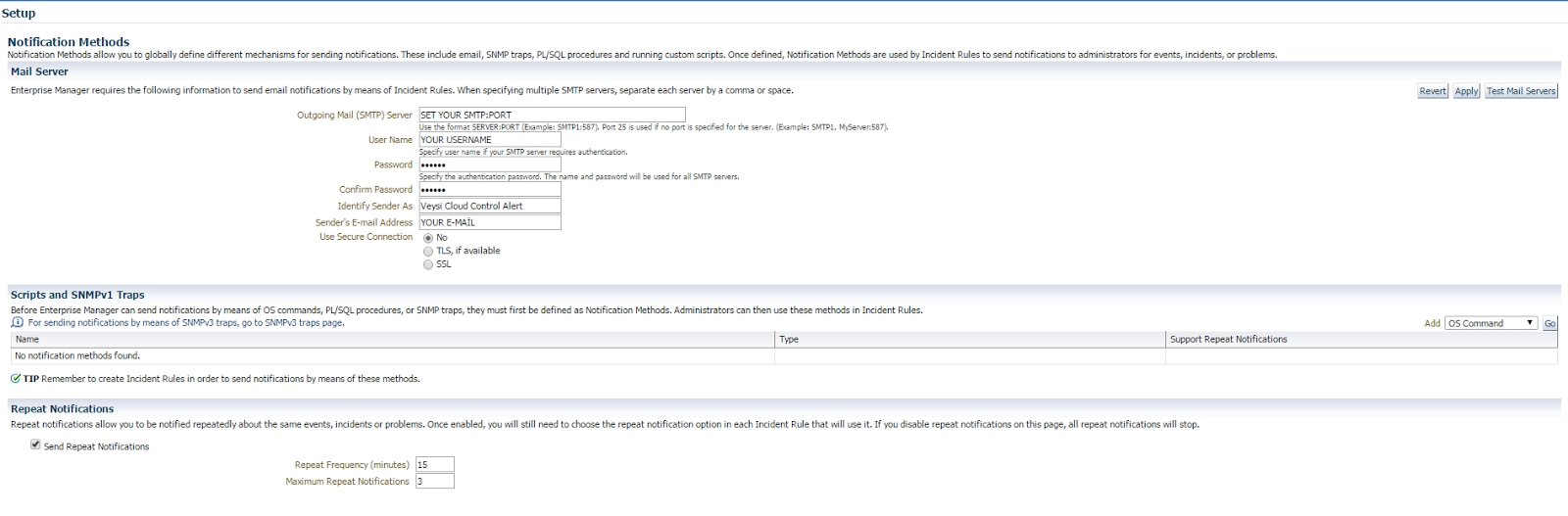
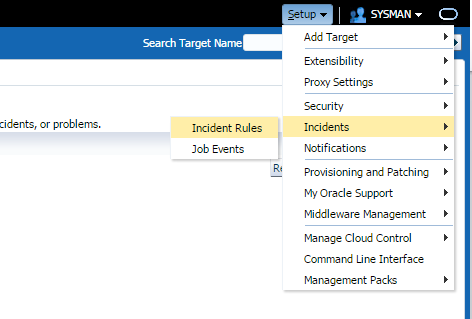
First of we have to login as SYSMAN user --> Then click Setup--> Notifications--> Notification Methods

At this Step we must provide SMTP server and email configurations.Also as you wish do repeat Notifications. Test Your email and smtp server configuration( you have to get mail, so check your mailbox)


Now let Set Rule. Click setup again--> İncident-->Incident Rules


Click Create Rule Setting

 Now we should fill down All rule setting. For more readable give the name and Description. Then..

On Target step we see 3 section.

All Targets

All Targets of type

Specific targets

Those section up on you :) i picked up all my targets

Then go to Rules and click create.

You may see 3 section(events,incidents,problems) of creating rules. Choose which you want to get then Click Continue.

Now we may configure targets for rule.

İ choose Metric alert and all of them also i did some advanced selections.

Click Next

 Now lets define the actions, we can pick up 1.Always execute the action or 2. Specified conditions.

On Notifications give Mail address then click continue.


So,You may see your configurations

Click Next

Give specific name and Description.

Click Next

Check your review

Click Continue

All we have done its here check all of them you may change some configuration if you finish then click save.

So, After all İf Agent,Listener,Database instance,Database System etc. you would able to receive notification from Oracle 12c


Hope this post would be helpful...

Tuesday, January 6, 2015

Oracle Golden Gate Useful Commands


Useful Oracle Golden Gate commands interpreter

Oracle Golden Gate Command executed at the GGSCİ. Many Troubleshooting command used by GGSCİ line.

Lets show you some basic commands.

To execute GGSCİ İnterface 

To execute History


To execute version

To show parameters

To execute manager status

To execute status of extract & replicat

To execute all extract status

To get information about manager

To get information detail about extract 

To get information about all extract or replicat

To get information about extrail


To get more information about status of extract

To get more information about status of all extract parameter

 Thank you very much next post will be soon..